
Your step goal, spread over the day
A short walk,
every hour.
Hourlap turns your daily step goal into 24 laps, one for every clock hour. Each asks for its share of what’s left, usually a few hundred steps. Walk it and your day stays on track. Sit an hour out, and the apps you choose lock until you get up.
iPhone, iPad and Apple Watch. Free to use; Pro unlocks your own goal.

A step goal you keep all day, not just at bedtime
A daily goal is easy to put off until the evening, and a day at a desk is long stretches of sitting in between. Spread over the hours, the same goal becomes a short walk every hour you’re up. What the research says about moving every hour.
- No evening catch-up
- Walk each hour’s number and you reach your goal by your day end, 22:00 unless you move it.
- It fits a desk day
- A few hundred steps is the long way to the kitchen, a call taken on your feet, the stairs instead of the lift.
- It adapts as you go
- Walked 3,000 by 9:00? The 9:00 lap asks 308 steps, not 424. Fall behind and later hours ask a little more.
One hour, one lap
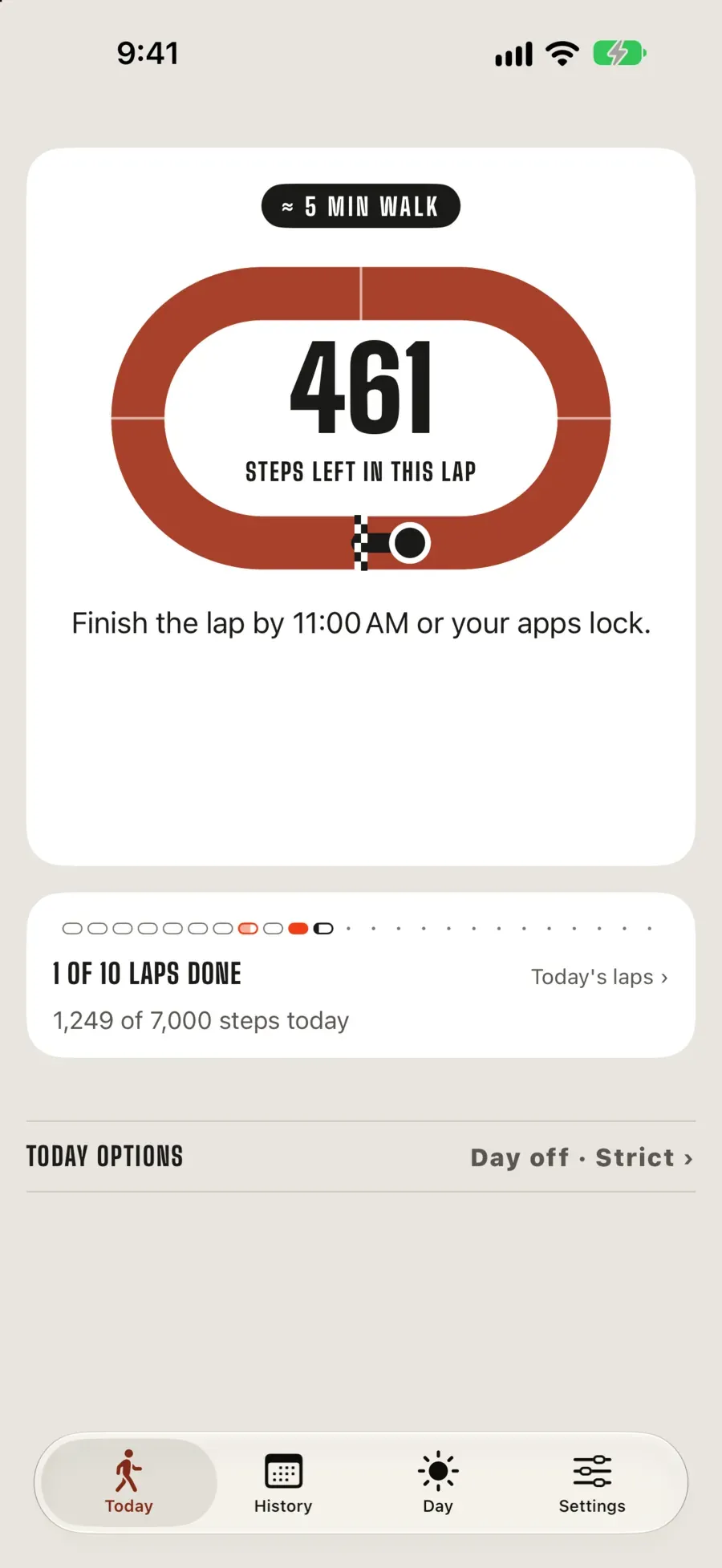
A Free day at 9:00 with 1,500 steps walked: 5,500 to go, 13 hours to the day end, so this hour asks 424.
During the hour
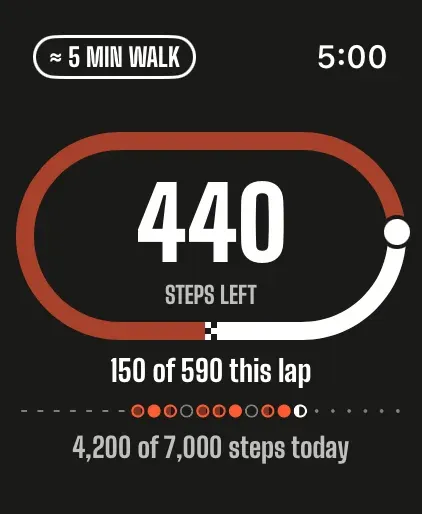
Home counts down the steps left and the walk they take. So do your Lock Screen and your Watch.
If it ends short
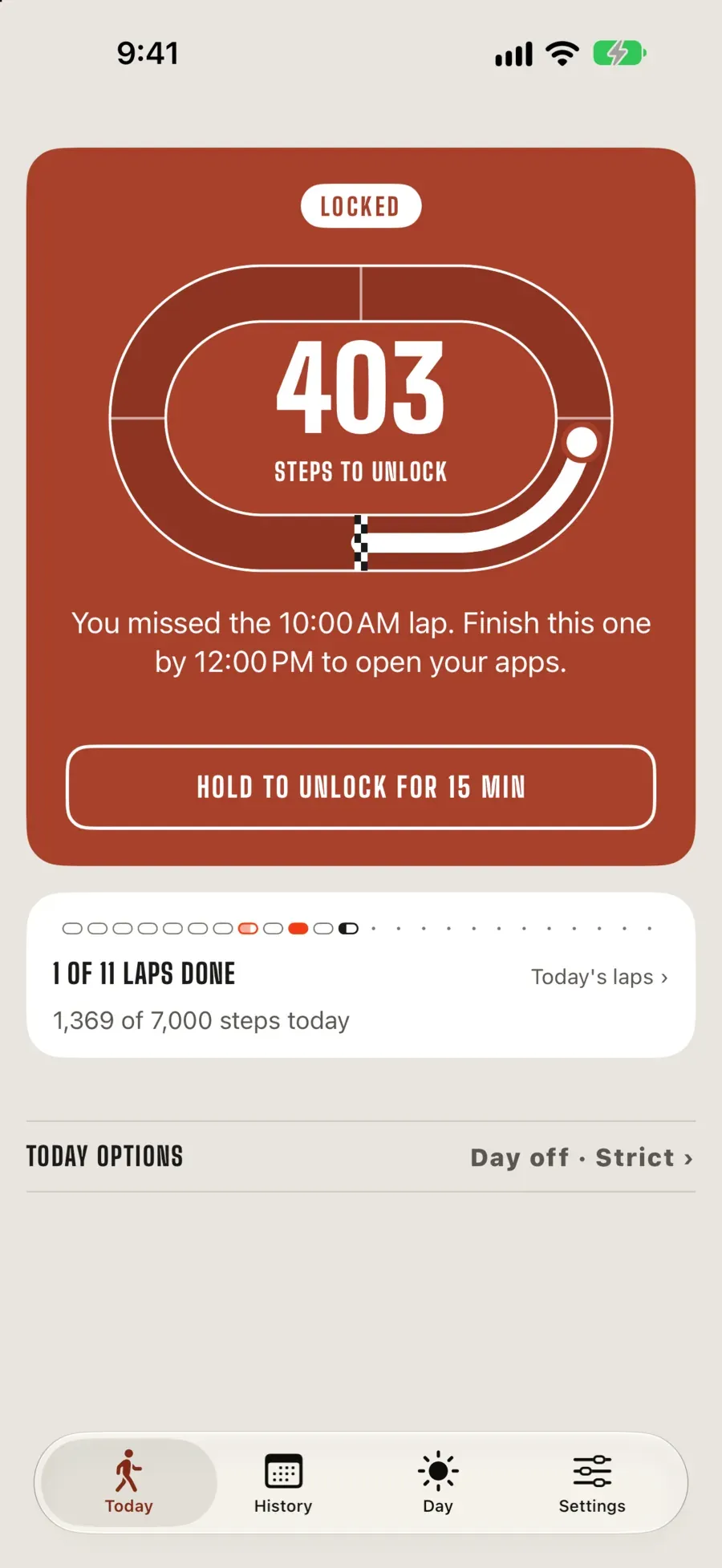
The apps you picked lock at the top of the hour, until you walk what the next hour asks. Or hold to unlock for 15 minutes.
Once the goal is in
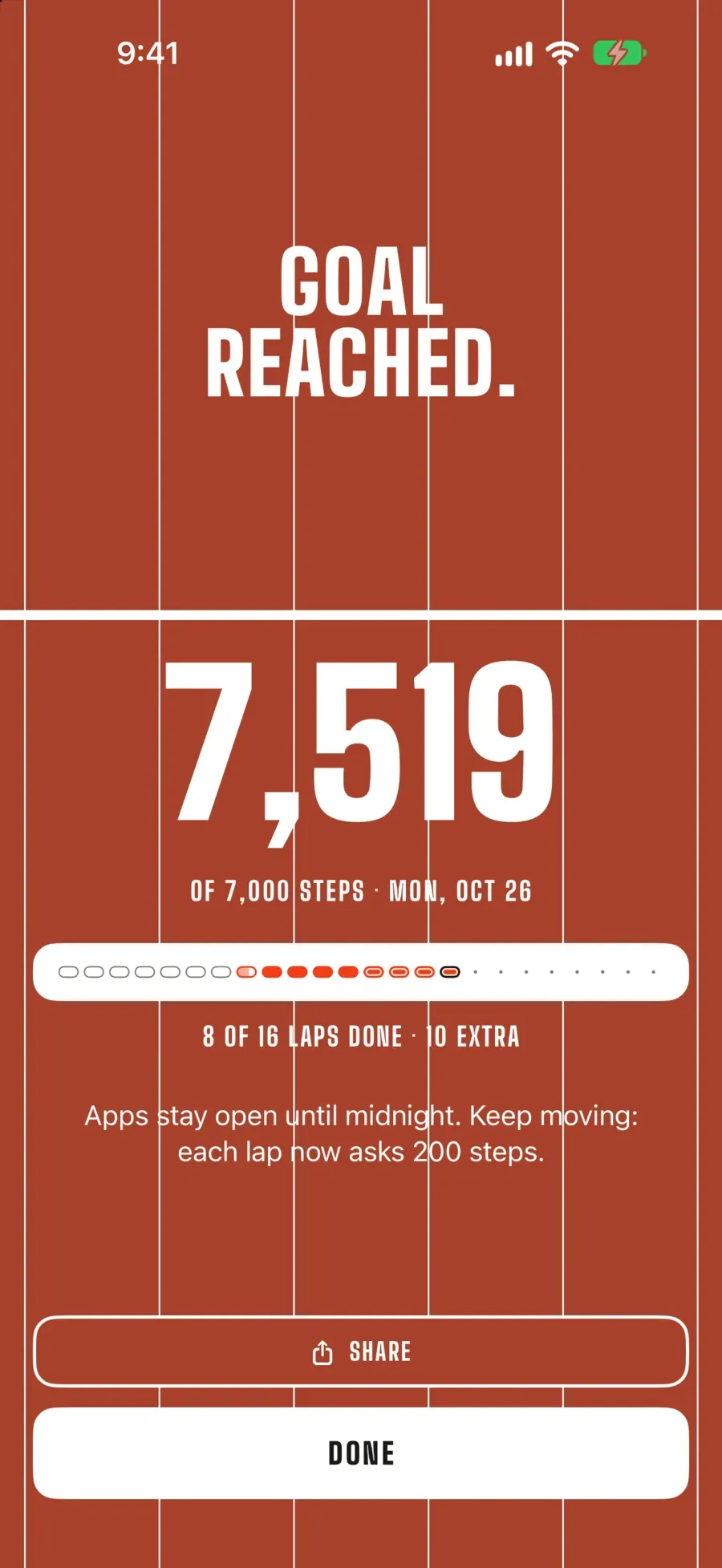
Everything stays open until midnight. Later hours still count as laps.
Your day, as 24 laps
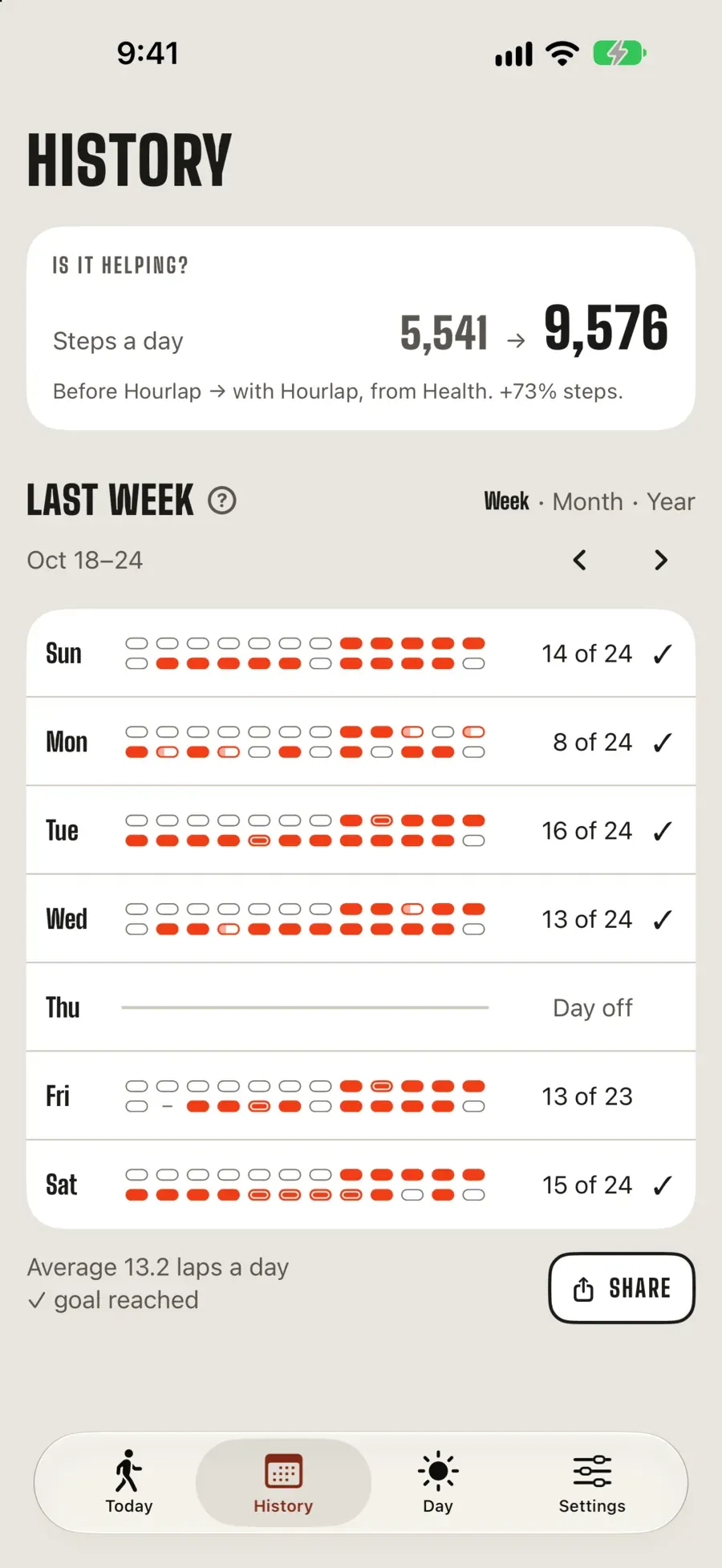
Every clock hour is a lap. History keeps each day’s, so you can see which hours you get up and which you don’t, and your steps a day before and since Hourlap, from Apple Health.
- 00:00, Under 200 steps
- 01:00, Under 200 steps
- 02:00, Under 200 steps
- 03:00, Under 200 steps
- 04:00, Under 200 steps
- 05:00, Under 200 steps
- 06:00, Under 200 steps
- 07:00, Done
- 08:00, Done
- 09:00, Done
- 10:00, Done
- 11:00, Short: apps locked
- 12:00, Done
- 13:00, Done
- 14:00, Done
- 15:00, Under way
- 16:00, To come
- 17:00, To come
- 18:00, To come
- 19:00, To come
- 20:00, To come
- 21:00, To come
- 22:00, To come
- 23:00, To come
7 of 24 laps done
At 15:00 on the default day, 7,000 steps by 22:00. Asleep overnight; the 11:00 meeting ran long.
- Done
- Short: apps locked
- Under 200 steps
- Under way
- To come
A reminder you can’t swipe away
Movement reminders are easy to dismiss. The app you were about to open is not, and a few hundred steps is quicker than arguing with it. Every day still has ways out.
- Unlock for 15 minutes
- A pause, not a pass: steps walked meanwhile still count.
- Take the day off
- Sick, travelling, a long flight: nothing locks that day.
- Calls and Settings stay open
- Never locked. Turning off Hourlap’s Screen Time access removes every lock.
- Strict today, with Pro
- No unlocks and no day off until midnight, for the days you mean it.
On your wrist, and wherever you look
- Apple Watch. The lap under way, complications and a Smart Stack widget. Your Watch hands the hour’s steps to your iPhone before the hour ends, so a walk with the phone on the desk counts.
- Lock Screen. A Live Activity with the steps left in this lap, and widgets that check your steps from the Home Screen.
- Siri and Shortcuts. Ask how many steps this hour still needs, or skip today, from Siri, Spotlight or the Action button.
- iPad. Its own pick of apps to lock, following your iPhone’s laps over iCloud sync.
Free, and Pro
| Feature | Free | Pro |
|---|---|---|
| Daily step goal | 7,000 steps | Your own, 1,000 to 50,000 |
| Apps and websites to lock | Up to 3 | Any number, and whole categories |
| History | This week | Every week, month and year |
| Strict today | No | Yes |
| Day end, unlocks, days off, Watch, widgets, both looks | Yes | Yes |
Hourlap Pro is an auto-renewing subscription, monthly with a 7-day free trial, or yearly. The App Store shows the price in your country; this site doesn’t list prices because they change.
Your steps stay yours
Your steps, your Health data, your History and the apps you lock stay on your devices. Hourlap uses Apple’s Screen Time framework, so it never even learns which apps you picked.
No account, no sign-up. iCloud sync, which you can turn off, carries only your settings and whether each hour was walked, never a step count. Read the privacy policy.
From the guides
Questions
What is Hourlap?
- Hourlap is an iPhone and Apple Watch app that spreads your daily step goal over the hours of the day, so you reach it with a short walk every hour instead of one push in the evening. Each hour asks for its share of what's left; if an hour ends short, the apps and websites you picked lock until you walk. It also runs on iPad.
Why walk a little every hour instead of all at once?
- Because a goal spread over the day is easier to keep: a few hundred steps an hour is a few minutes' walk, and nothing is left for the evening. It also breaks up long stretches of sitting, which a single walk doesn't. Move every hour looks at what the research says.
How many steps does each hour ask for?
- Each hour asks for its share of what's left: the steps still to your goal divided by the hours left until your day end, never fewer than 200. On the default day (7,000 steps by 22:00) a still morning starts at 319 an hour, and the number drops as you walk ahead of it. It is fixed when the hour starts.
Is Hourlap free?
- Hourlap is free to use with a 7,000-step daily goal, up to 3 apps and websites, and this week's History. Hourlap Pro adds your own daily goal, from 1,000 to 50,000 steps; any number of apps, websites and whole categories; your full History: every week, month and year; Strict today: no unlocks and no days off until midnight. Pro is an auto-renewing subscription, monthly with a 7-day free trial, or yearly; the App Store shows the current price in your country.
Can I get around the lock?
- Yes, on purpose: you can always remove every lock by turning off Hourlap’s Screen Time access in iOS Settings, and Hourlap can’t stop that. Inside the app, the ways out are the 15-minute unlock and days off; Pro’s Strict today takes both away until midnight, for the days you want no escape.

One lap.
Then the next.
A few minutes’ walk every hour you’re up, and your step goal is done before the evening starts.